
Mobile + Web in sync
Take L1st.ai in your pocket
Scan receipts on the go, add items with voice, and see your lists sync instantly across every device. Same AI, same lists, always with you.
Available worldwide in English, French and Dutch.


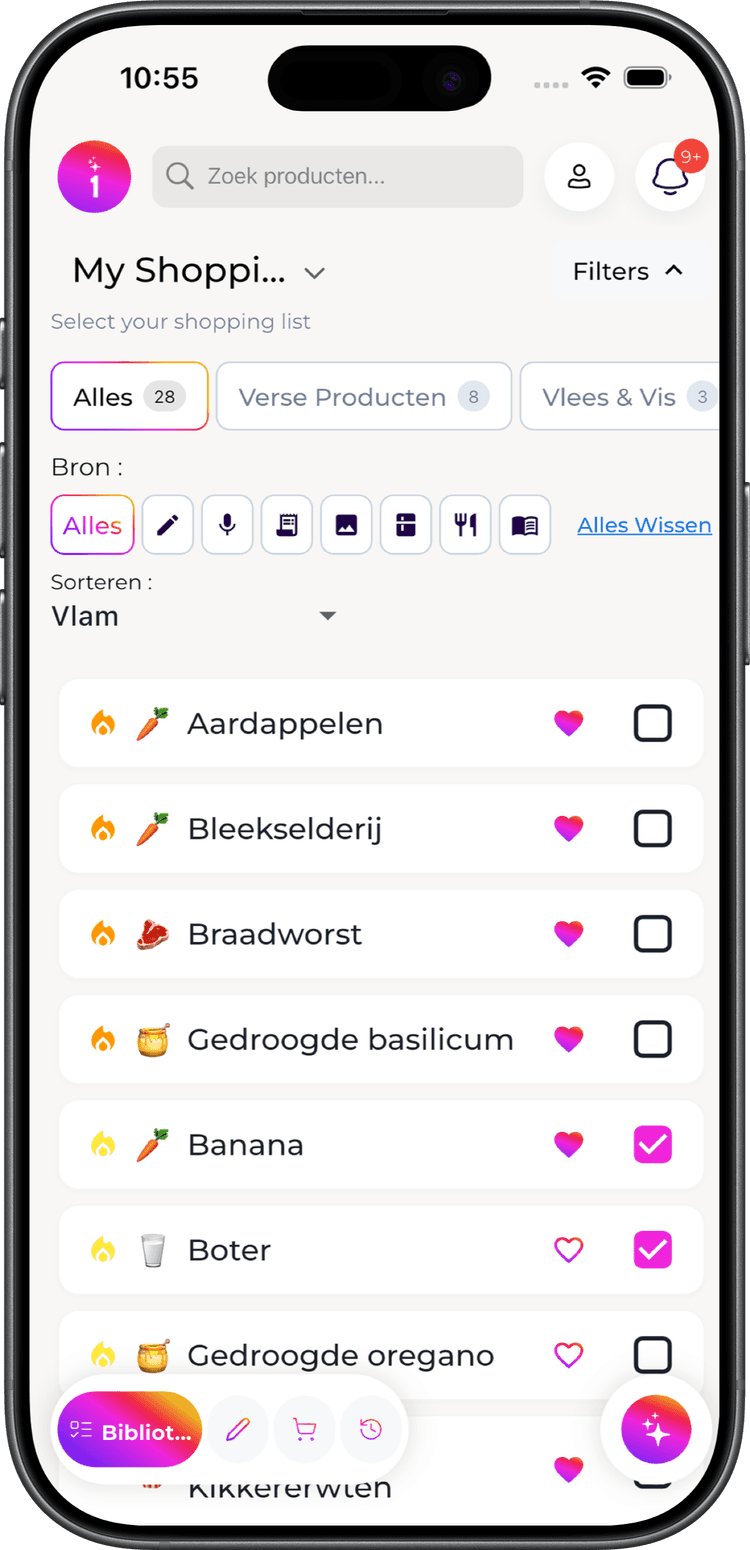

Built for shopping on the move
Capture, curate, and check off faster with native mobile workflows.
Fast native capture
Open camera instantly and scan receipts without switching apps. AI extracts products in seconds.
Flame urgency on the go
See what you're running low on before you leave home. Never forget milk or eggs again with predictive reminders.
Promos in your pocket
See which items on your list are on promo at nearby chains this week—before you leave the house.
Hands-free voice input
Add individual items while driving, cooking, or putting away groceries. Say 'Add milk' and you're done.
Offline shopping lists
View and check off your list even when reception drops in store. Changes sync automatically when you're back online.
Real-time sync
Every change syncs to web instantly—no conflicts, no waiting. Family sees updates as you add items.
Why Download the Mobile App?
The web app is powerful. The mobile app is essential.
Instant Receipt Scanning
Open camera, snap receipt, done. No switching apps or uploading files. Products appear in seconds.
Flame Urgency Indicators
See which items you're running low on at a glance. Flame icons highlight products to add to your list before you run out.
Hands-Free Voice Adding
Add individual items while driving, cooking, or with full hands. Say 'Add milk' and it's on your list.
Works in Store Dead Zones
Supermarket basements with no signal? No problem. Check off items offline, syncs when you're out.
Faster In-Store Shopping
One-handed operation, large touch targets, quick check-offs. Optimized for shopping with a cart.
Deals While You Shop
Pull up this week's promos for the chain you are standing in, straight from your list.
Bottom line: Use web for planning. Use mobile for shopping. They work together seamlessly.
Mobile vs Web—same power, different moments
Pick the device that fits the moment. Everything stays in sync.
| Feature | Mobile | Web | Why it matters |
|---|---|---|---|
| AI receipt scanning | ✅ | ✅ | Scan in store or at home |
| AI prompt method | ✅ | ✅ | 'Add ingredients for pasta bolognese' |
| Voice commands | ✅ Hands-free | ✅ Typing faster | Mobile: while driving, cooking |
| Flame urgency indicators | ✅ Push alerts | ✅ | Mobile notifies before you shop |
| Weekly promo matching | ✅ | ✅ | Retailer deals matched to your list |
| Shop Mode | ✅ In-store | ✅ Planning | Mobile: hands-free checking |
| Offline access | ✅ | ⚠️ Requires internet | Mobile works in dead zones |
| Native camera | ✅ Instant | — | Mobile: no switching apps |
| Push notifications | ✅ | — | Reminders, deals, low stock |
| Large screen editing | ⚠️ Small screen | ✅ | Web: bulk management |
| Keyboard speed entry | — | ✅ | Web: fast manual input |
| List sharing | ✅ | ✅ | Collaborate with family |
📱 Use Mobile When...
- • Shopping in store (offline mode, quick check-off)
- • Adding items on the go (voice, camera)
- • Getting reminders (push notifications for flame urgency)
- • Scanning receipts immediately after checkout
💻 Use Web When...
- • Planning weekly meals and lists
- • Bulk editing your library
- • Analyzing shopping history and prices
- • Fast manual entry with keyboard
Frequently Asked Questions
Do I need to download the app to use L1st.ai?
No. You can use the web app at l1st.ai on any device. The mobile app adds features like offline mode, push notifications, and native camera scanning—but it's optional.
Does the mobile app cost extra?
No. The app is free to download. Core features work forever without payment. Upgrade to Premium (€3.99/month) for access to AI features. Start with a 14-day free trial.
Will my lists sync between mobile and web?
Yes. Everything syncs in real-time. Add an item on mobile, see it on web instantly. Check off on web, mobile updates immediately.
Does the app work offline?
Yes. Your lists, library, and shop mode work offline. Changes sync automatically when you reconnect. Perfect for store basements with no signal.
Can I share lists with family who use the web version?
Yes. Sharing works across all platforms. You can use mobile, they can use web—everyone sees the same real-time updates.